I care deeply about Google Ads on a budget because I have been there. When I started, we did not have a lot of money to spend. Like many small business owners, every dollar mattered to me. I had to learn fast or lose fast.
Many small businesses assume Google Ads is only for big brands. That is not true. Even with a small budget, you can get real results. You just need focus, clear goals, and smart decisions.
I made mistakes. I wasted money. I learned the hard way. But those lessons helped me build campaigns that actually worked.
In this guide, I will share what I learned from running ads with limited funds. You will learn how to control costs, improve returns, and spend smarter with every click. This is about seeing results without wasting your budget.
In my early campaigns, I started small. My daily Google Ads budget was low. Some days I spent ten dollars. Other days, it was closer to twenty. I watched every dollar. Monthly limits mattered too. If I went over, I felt it.
At first, I did not track enough. I only looked at clicks. That was a mistake. Once I started tracking spend, clicks, and real conversions, everything changed. I could see what worked and what failed. That is when results improved.
This is the heart of PPC budget management. You must know your numbers. CPC means cost per click. It is what you pay when someone clicks. CPA means cost per action. It is what you pay when someone buys or signs up. Daily spend is the amount you allow Google to use each day.
When you ignore these numbers, money can vanish before you know it. Bad clicks add up. This is why CPC optimization strategies matter. If you don’t track your data, your budget will burn before you see results.
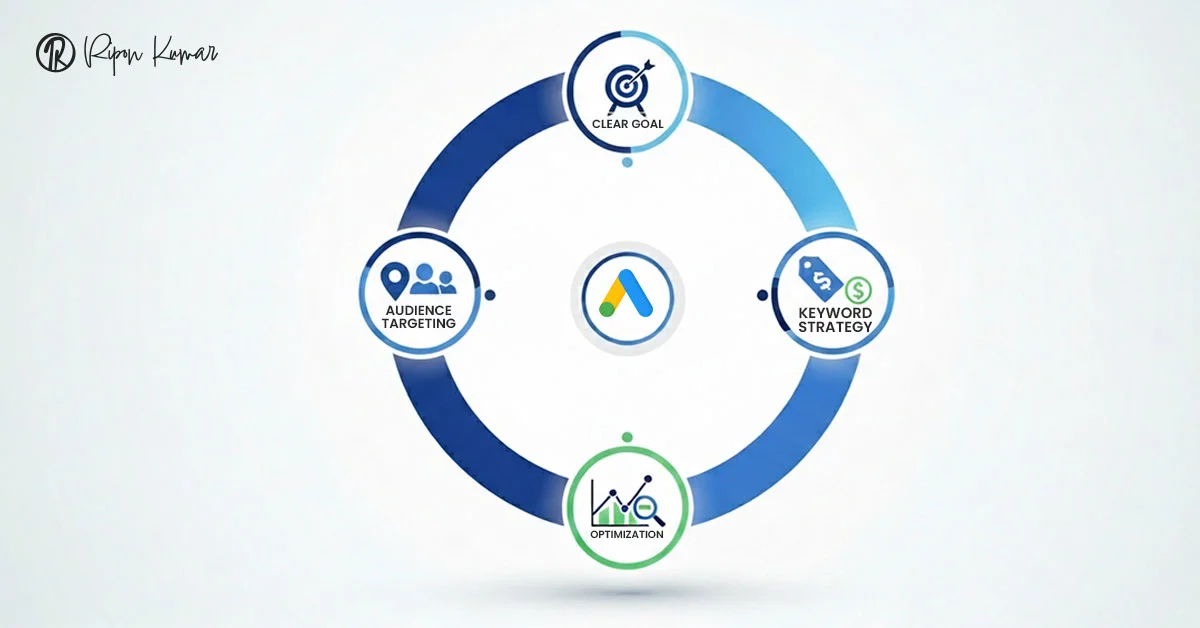
Before you spend a single dollar, you need a clear goal. Are you trying to get sales, leads, or calls? Knowing this shapes your budget and ads.
When I started, I tried to do everything at once. I spent money on the wrong clicks and wasted days. Once I focused on one main goal, everything improved. I could tell which ads were bringing results and which were wasting money.
This is the heart of PPC budget management. Planning with purpose matters more than just spending. Even Google Ads for small businesses can work well if you start with a clear goal.
One of the first lessons I learned was the power of location. Narrow your ads to the areas where your customers live. This keeps your budget focused and avoids wasted clicks.
Audience choices also save money. Look at age, interests, and online behavior. Focus on the people who are most likely to become customers. I spent money on ads that reached everyone instead of the right audience. That changed when I focused on the right audience.
Another tip is ad scheduling. Run your ads when your customers are most active. Don’t spend money when they are unlikely to see or click.
Even with a limited budget, these small adjustments can boost your Google Ads performance. Focusing your ads on the right people is one of the easiest ways to make affordable PPC advertising actually work.
Keywords drive most of your Google Ads cost. I learned that not all keywords are equal. Some cost a lot and bring little value. Others cost less and attract people who are ready to make a purchase.
In my campaigns, focusing on them cut my CPC and increased conversions.
Here are the key steps I follow:
Even with Google Ads on a budget, these steps make a big difference. Focusing on the right keywords is one of the easiest ways to run affordable PPC advertising. Track and adjust, and your CPC optimization strategies will stretch every dollar.
When I started, I used Manual or Enhanced CPC to control my bids. This lets me decide how much to pay for each click. I could manage my budget better and avoid overspending.
I waited to switch to automated bidding. I only tried it after I had consistent conversion data. Without that, automated bids can burn through your budget.
There are smart bidding options such as Target CPA and ROAS. Target CPA helps you get conversions at a specific cost. ROAS focuses on return on ad spend. They work well once you have data and a clear goal.
At first, I didn’t start with automated bids because I wanted full control. Once I switched, I saw better results and spent my budget more efficiently.
Keeping a close eye on your bids is key to good PPC budget management. Using the right strategy also improves your CPC optimization strategies. It helps every dollar go further.
One of the easiest ways to lower costs is to improve your Quality Score. The idea is simple: relevant ads, better landing pages, and more clicks. Google sees these as useful and charges less per click.
I worked on ad relevance by improving copy and tweaking landing pages. Small changes made a big difference. I also tested headlines, calls to action, and offer wording often. Testing helped me see what worked and what didn’t.
Even with Affordable PPC advertising, focusing on quality pays off. A good Quality Score reduces wasted spend and improves results. Tracking clicks and making regular adjustments is key to effective CPC optimization strategies. Over time, these small improvements make every dollar go further.
I review my campaigns every week. Weekly checks work much better than “set it and forget it.”
Each week, I look at cost per conversion, top keywords, and wasted spend. This shows what is working and what is not. I pause or cut campaigns that do not deliver results.
Small shifts can make a big difference. For example, I move the budget from poor performers to campaigns that bring the best results.
Even with Google Ads on a budget, regular review keeps your money from being wasted. Watching your campaigns closely is a key part of PPC budget management. Adjusting frequently helps you spend smarter and get better results from every dollar.
Running Google Ads doesn’t have to be overwhelming. Even with a tight budget, the right strategy can deliver meaningful results.
Here’s what I’ve learned from my experience. Before you launch your ads, these key steps will keep your campaigns on track:
Start small and test before scaling. Testing helps you see what works and avoid wasted spend.
Even with a limited budget, you can get real results. Focus on what matters, be patient, and adjust often.
Running Google Ads for small businesses or campaigns on a Google Ads on a budget doesn’t have to be expensive. With care and planning, Affordable PPC advertising can deliver strong results and make every dollar count













Entrepreneur | CEO of Ray Advertising & Policy Bear | Investor